OdooBots
Loading
Module · Accounting

Odoo Accounting

An accounting system that is typed into is a record of what someone remembered. An accounting system fed by the operation is a record of what happened, and that is the whole argument for doing accounts inside the ERP rather than beside it.

In Odoo, the invoice comes from the delivery, the bill is matched to the purchase order, and the stock valuation posts itself. What is left for the accounts team is judgement rather than keying.

Suresh BabuOdoo Solution Architect, 7+ years| Reviewed by Karthik Raj| Updated 20 October 2026| Covers Odoo 16–19, Community & Enterprise
0Odoo projects delivered
0Consultants & developers
One ledgerFed by the operation itself
ChennaiAmbattur, Tamil Nadu
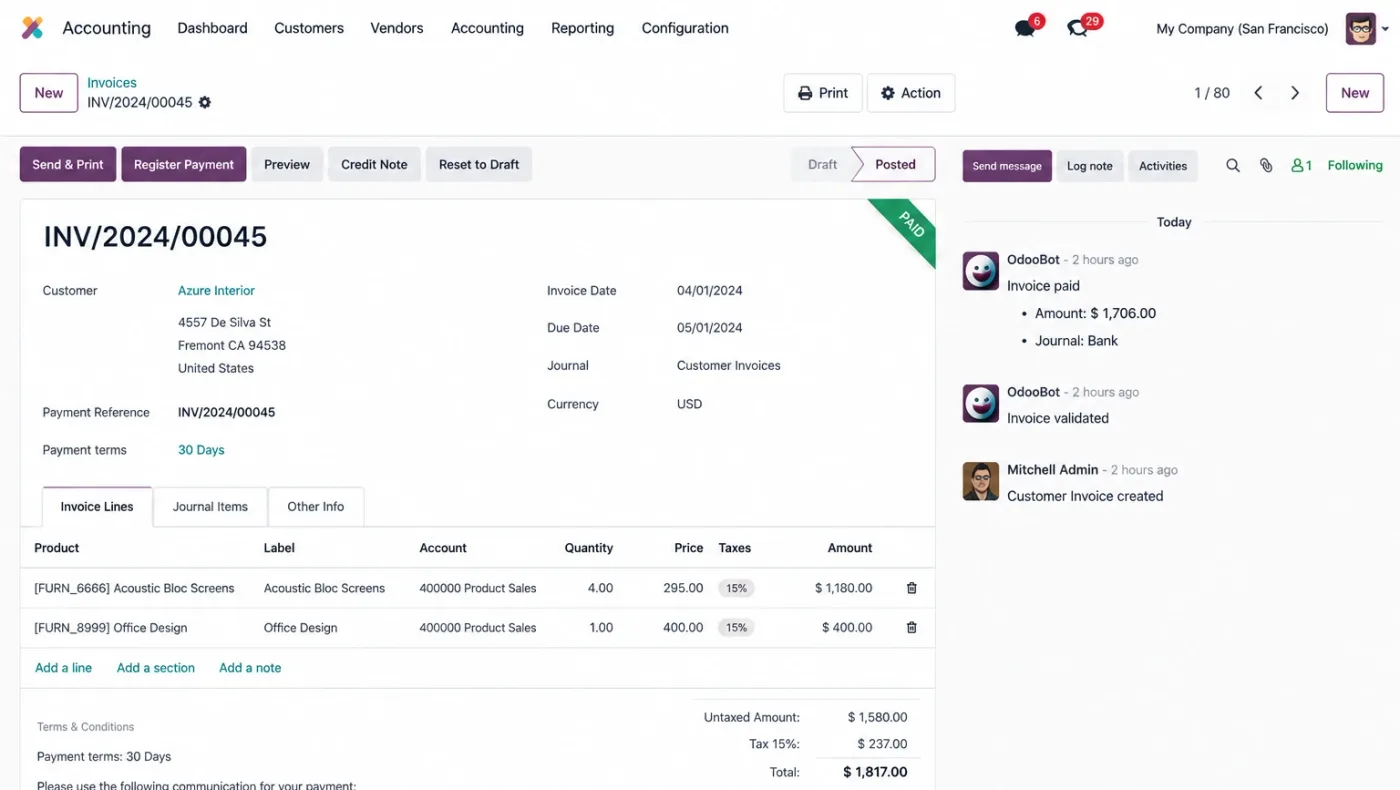
Odoo Accounting — customer invoices, vendor bills and bank reconciliation in one ledger
630
630+ projectsdelivered on Odoo

Businesses running Odoo with OdooBots

Dhanalakshmi Industries logo Sanjeev Autoparts logo Electro Flux Equipments logo Anchor Marine Equipment Company logo NEXG logo PV Constructions logo SESS logo
Definition

What is Odoo Accounting?

Odoo Accounting is a double-entry ledger that is posted to by the rest of the system rather than entered by hand. Customer invoices come from delivered sales orders, vendor bills are matched against purchase orders and receipts, stock moves post their own valuation entries, bank statements reconcile against those documents, and analytic accounting tags every line to a project, department or branch so margin can be reported without a spreadsheet.

Odoo will not fix an opening balance that was wrong on day one. Every report you build afterwards inherits that error, and it is the single most common reason an accounts team goes back to its old system.

Analytic account
The second dimension on a journal line — project, department, branch. What makes margin reporting possible.
Three-way match
Purchase order, goods receipt and vendor bill agreeing before payment. A control, not a formality.
Anglo-Saxon accounting
Stock valuation posting at delivery rather than at invoice. Changes when your cost of goods sold appears.
Lock date
The date before which nothing may be posted. The thing that makes a closed period actually closed.
Capabilities

What Odoo Accounting does

Six areas make up the accounting application, and most of their input arrives from elsewhere in Odoo rather than from a keyboard.

Customer invoicing

Invoices raised from delivered orders or directly, with payment terms, part payments, credit notes and follow-up levels, plus a customer portal where the invoice can be viewed and paid online through a payment provider.

From deliveryOnline paymentPortal

Vendor bills and payables

Bills matched against the purchase order and the goods receipt before payment, with batch payment runs, and payable and receivable ageing reported side by side so the cash position is one view.

Three-way matchBatch payAP & AR ageing

Bank and cash

Statement import or synchronisation, reconciliation models that match recurring lines automatically, and cash registers for counter collections.

StatementsMatch rulesCash

GST and e-invoice

Indian localisation with GST taxes, HSN, GSTR reporting, e-invoice and e-way bill generation through the government portals.

GSTe-Invoicee-Way bill

Analytic accounting

Every journal line taggable to a project, department, branch or cost centre, which is what turns a profit and loss into something a manager can act on.

ProjectsBranchesMargin

Reporting and close

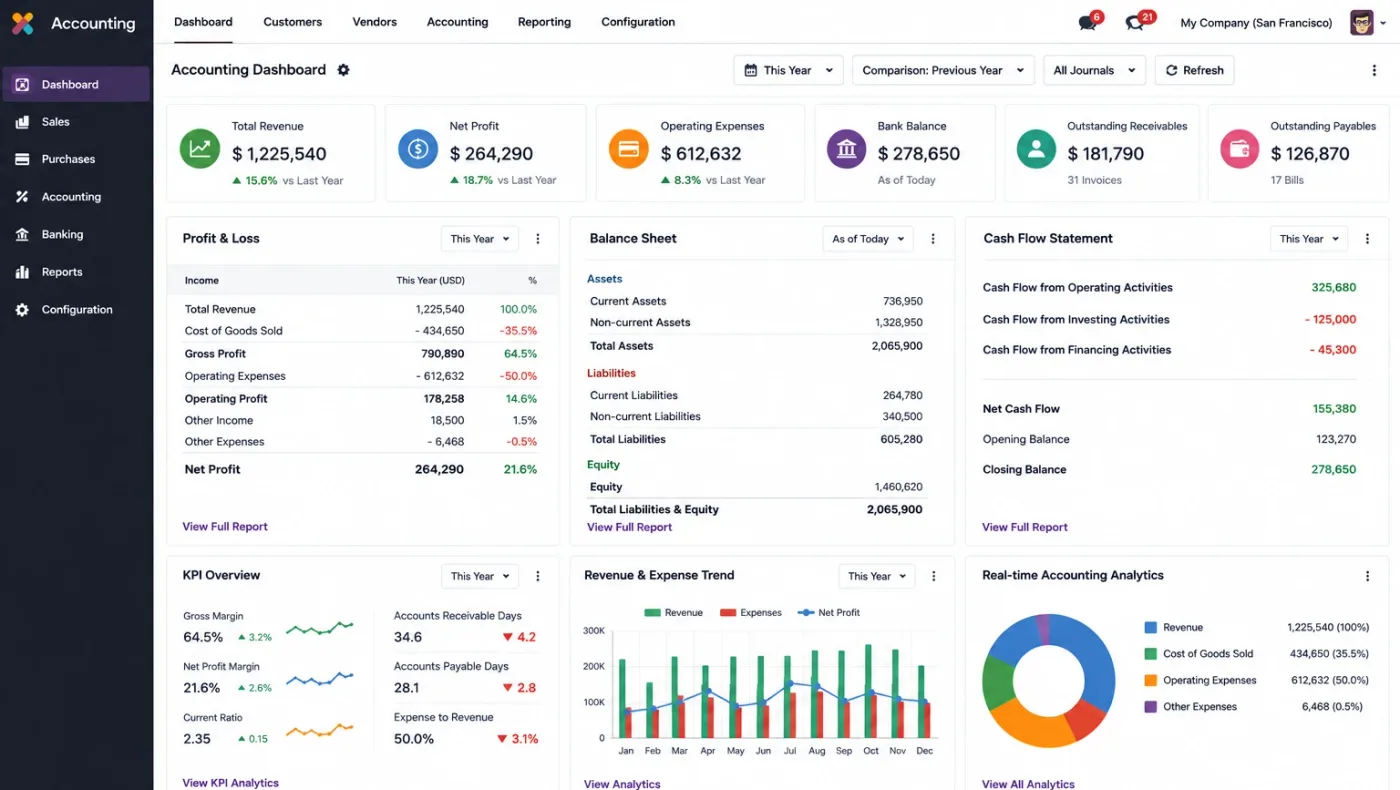
Balance sheet, profit and loss, cash flow, ageing and tax reports from live data, with lock dates so a closed period stays closed.

Live reportsLock datesTax
Connected

How Odoo Accounting works with the rest of Odoo

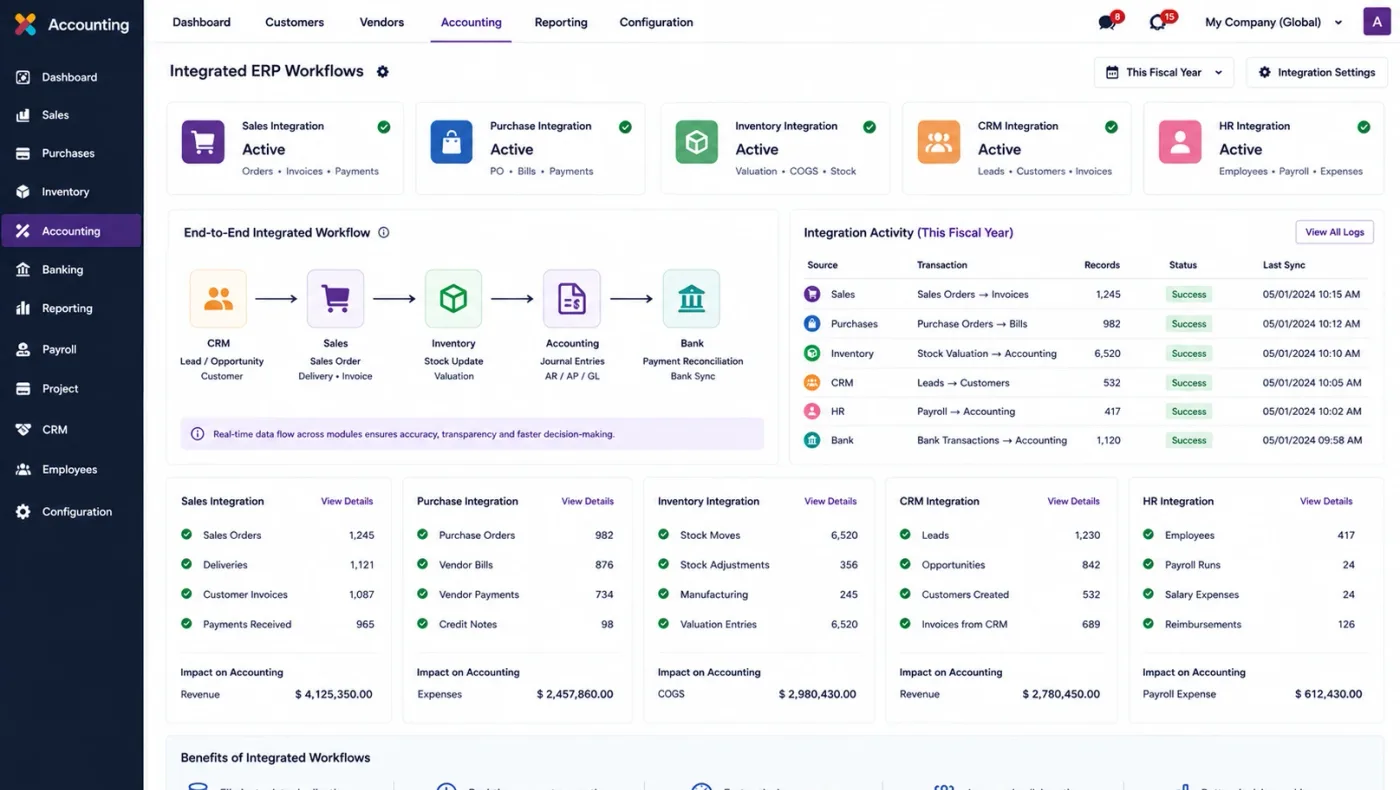
A delivered sales order produces its invoice. A goods receipt lets a vendor bill be matched and approved. A stock move posts its own valuation entry if you are on the anglo-saxon method. A payment reconciles against the bank statement line that brought it in.

That chain is why accounts in an ERP are different from accounts in a separate package: the ledger is a consequence of the operation rather than a second description of it, so there is nothing to reconcile between the two.

  • Invoices raised from what was actually delivered, not from the order
  • Vendor bills matched to the purchase order and the receipt before payment
  • Stock valuation posted by the stock move itself, on your chosen method
  • Analytic tags carried from the order through to the journal entry
  • Bank lines reconciled against the documents that created them
Odoo Accounting connected to the other Odoo applications in one database
One database — how accounting shares records with the rest of Odoo instead of exporting to it.
Expertise · how we work

What we settle in week one of an Odoo accounting implementation

These are the configuration decisions that are cheap to make now and structural to change once transactions exist. We walk through each one before a single record is migrated.

  1. Chart of accounts structure

    Built from the Indian localisation and adapted, rather than rebuilt from your old software account by account. Carrying over a messy chart is carrying over the problem.

  2. Opening balances and cut-off

    What comes across, as of which date, and who reconciles it. Everything you report afterwards rests on this being right.

  3. Analytic structure

    Project, department, branch or cost centre — decided before the first transaction, because every line tags to it and retrofitting means re-tagging history.

  4. Stock valuation method

    Standard, FIFO or average, per product category, and whether valuation posts automatically. The most common reason a margin report is wrong.

  5. GST and e-invoice readiness

    HSN codes, place of supply, GSTIN on partners, and whether e-invoice applies to your turnover. Cheap now, painful during a filing week.

  6. Who may post, and until when

    Lock dates and posting rights, so a closed period cannot be reopened quietly by someone fixing one entry.

  7. Approval thresholds

    Which bills and payments need a second pair of eyes and above what value, configured rather than remembered.

Community or Enterprise

What Odoo Accounting includes, and what needs Enterprise

Odoo moves features between Community and Enterprise from one version to the next, so the list below is what holds today and is confirmed against your own version during the diagnosis rather than taken as permanent.

Community gives you a genuine double-entry ledger: invoices, vendor bills, journals, taxes, the Indian localisation and the standard financial reports. For many small businesses that is the whole requirement.

What Enterprise adds is mostly automation of the work around the ledger rather than the ledger itself, which is why the honest question is how many hours a month those features actually save you.

  • Bank synchronisation — automatic statement feeds rather than manual import. Enterprise.
  • Invoice digitisation (OCR) — reading supplier bills into drafts. Enterprise, and charged by credit.
  • Asset and deferred revenue management — depreciation and recognition schedules. Enterprise.
  • Follow-up automation — staged reminder levels on overdue invoices. Enterprise.
  • Studio — adding fields and screens without code. Enterprise, and worth pricing against a custom module.
  • Community is enough when your bills are few, your statements import cleanly and nobody needs depreciation schedules.
Odoo Accounting reporting view used to compare Community and Enterprise features
Editions — the features that decide whether Enterprise is worth its per-user charge.
Trust · honest advice

Where Odoo Accounting needs work

We would rather say this before you buy licences than after. These are the areas where we scope real development, recommend a bolt-on, or tell you another tool is the better answer.

Statutory filing itself

Odoo produces the data and the returns; filing, reconciliation against the portal and notices are still your accountant’s work.

Complex consolidation

Group consolidation with eliminations and minority interests usually needs Enterprise plus configuration, and sometimes a separate tool.

Ind AS and IFRS adjustments

Standards-specific treatments beyond the localisation need configuration and often custom reporting, with your auditor involved.

Costing beyond the three methods

Anything outside standard, FIFO or average — activity-based costing, for instance — is custom development.

Legacy history

Importing years of past transactions is rarely worth the effort. Opening balances and open items usually are.

Tally-shaped habits

Odoo does not have a Tally keyboard flow, and expecting one is a training problem rather than a software one. See Tally to Odoo migration.

Our services

Our Odoo accounting implementation process

Implementing Odoo Accounting needs more than installing the application. It should reflect how your business already works, and change only what is worth changing.

  1. What you do today

    Understand your chart of accounts, your GST position, how bills are approved today, and what reporting your management and auditor actually use.

  2. Configuration decisions

    Settle the analytic structure, the stock valuation method, opening balance cut-off and lock date policy before anything is configured.

  3. Configure, not customise

    Set Odoo Accounting up around how you work rather than installing it at its defaults, and build only what configuration genuinely cannot reach. See Odoo customization.

  4. Data migration

    Masters, open items and opening balances prepared and loaded. Data cleaning is scoped explicitly, because it is usually the largest single task. See Odoo migration.

  5. Testing with your own records

    Your team runs real transactions in a test database before go-live, including the awkward cases that never appear in a demonstration.

  6. Training and go-live

    Role-based training for the people who key transactions daily, then cutover, hypercare and ongoing support and AMC.

Trust · what it costs

What an Odoo Accounting implementation costs

We do not publish one price, because the same application costs very differently depending on the factors below. We do publish what moves the number, and the price is fixed in writing before work starts.

  • Opening data qualityCleaning and reconciling opening balances is usually the largest single task.
  • Number of companiesMulti-company means separate books, inter-company rules and consolidated reporting.
  • GST and e-invoice scopeE-invoice and e-way bill integration is configured and tested separately.
  • Analytic depthSeveral analytic dimensions need design and discipline, not just setup.
  • Approval chainsThreshold-based approvals on bills and payments add configuration.
  • Report expectationsManagement reports beyond the standard set are custom and scoped separately.
Why us

Why choose OdooBots to implement Odoo Accounting

We reconcile your opening balances before go-live rather than after, because an accounts team that finds its first trial balance wrong never trusts the system again. It is the dullest week of the project and the one that decides it.

Based inAmbattur, ChennaiTamil Nadu 600053, India
Phone+91 98414 81435Mon–Sat, business hours IST
Delivered630+ Odoo projects30+ consultants and developers
Versions supportedOdoo 16 – 19Community and Enterprise
FAQ

Odoo Accounting: frequently asked questions

What is Odoo Accounting?
A double-entry ledger that the rest of Odoo posts to: invoices raised from delivered orders, vendor bills matched against purchase orders and receipts, stock valuation posted by the stock move, bank statements reconciled against those documents, and analytic tags carried through so margin is reportable by project, branch or department.
Does Odoo handle GST, e-invoice and e-way bill?
Yes, through the Indian localisation: GST taxes, HSN codes, place of supply, GSTR reporting, and e-invoice and e-way bill generation through the government portals. What it does not do is the filing itself or the follow-up on notices, which stay with your accountant.
Do we need Odoo Enterprise for accounting?
Not necessarily. Community includes a real double-entry ledger with invoices, bills, taxes, the Indian localisation and standard reports. Enterprise adds bank synchronisation, invoice OCR, asset and deferred revenue management and follow-up automation, so the question is how many hours a month those actually save you.
Can Odoo reconcile bank statements automatically?
Statements can be imported or, on Enterprise, synchronised from the bank, and reconciliation models match recurring lines automatically. Each matched line still ties back to the invoice or bill that created it, which is what makes the reconciliation meaningful rather than cosmetic.
How does analytic accounting work in Odoo?
Every journal line can carry a second dimension — project, department, branch or cost centre — inherited from the order or bill that produced it. It is what turns a company profit and loss into something a manager can act on, and it has to be designed before the first transaction because retrofitting means re-tagging history.
Can we move from Tally to Odoo?
Yes, usually with opening balances, open items and master data rather than years of history. The harder part is the change in working method: Odoo has no Tally keyboard flow, and that is a training issue rather than a software gap. See Tally to Odoo migration.
When does stock valuation post in Odoo?
On the anglo-saxon method it posts at delivery rather than at invoice, which changes when cost of goods sold appears in your accounts. The method is chosen per product category in week one, and it is the most common reason a margin report turns out wrong.
Can a closed period be protected?
Yes, with lock dates that prevent posting before a given date, combined with posting rights. Without them a closed month quietly reopens whenever someone fixes a single entry, and the figures you reported stop matching the figures in the system.
References

Sources and official documentation

Product capabilities stated on this page are documented by Odoo. The configuration advice, edition notes and limitations come from our own implementations.

Ready to put Odoo Accounting to work?

Tell us how your opening balances stand today and whether e-invoice applies to your turnover. Those two answers shape the project, and the diagnosis call is free.